This website stores cookies on your computer. These cookies are used to improve your website experience and provide more personalized services to you, both on this website and through other media.
Accept
EdTechReviewEdTechReview
  • News
  • Trends
  • Insight
  • eLearning
  • Research
  • Dictionary
  • EdTech Voices
  • More
    • Data & Statistics
    • Reviews
    • AWS for Education
    • Events

    Resources

    • Infographics
    • Reports & Case Studies
    • Videos
    • Books
    • Webinar

    Needs

    • 1:1 Learning
    • 21st Century Education
    • 21st Century Leadership
    • 21st Century Learning
    • 21st Century Teaching
    • 3D Printing
    • More Tags

    For

    • Students
    • Teachers/Educators
    • Administrators
    • Entrepreneurs/Startups
    • Govt. Officials/Policymakers
    • Parents
Explore
Search
Contribute
  • Submit A Post
  • EdTech Trainers and Consultants
  • Your Campus EdTech
  • Your EdTech Product
  • Your Feedback
  • Your Love for Us
  • EdTech Product Reviews
ETR Resources
  • About
  • Medicine
  • Mission/Vision
  • Children
  • Team
  • Coronavirus
  • Services
  • Nutrition
  • Testimonials
  • Disease
  • Authors
  • Sponsor
  • Stars
  • Partner
  • Screen
  • Advertise
  • Culture
  • Our Clients
  • Media
  • Media Kit
  • Videos
  • Press Release
  • FAQ’S
Reading: How To Build Apps Using MIT App Inventor?
Aa
EdTechReviewEdTechReview
Aa
Search
  • News
  • Trends
  • Insight
  • eLearning
  • Reviews
  • Dictionary
  • EdTech Voices
  • Data & Statistics
  • Research
  • AWS for Education
  • Events
  • Voices
Follow US
EdTechReview > Trend & Insight > Insight > How To Build Apps Using MIT App Inventor?
Insight

How To Build Apps Using MIT App Inventor?

Saniya Khan
Saniya Khan Published August 27, 2021
Share
6 Min Read
How To Build Apps Using MIT App Inventor?
SHARE

Programming with the Blocks Editor

Now that you have completed the initial steps, you are ready to start programming the app behaviour. For that, you have to go to the Blocks editor. Click the Blocks button, available on the top right of your screen to access the Blocks Editor.

Contents
Programming with the Blocks EditorPackaging your appSecond wayTalkToMe: A beginner App Inventor app (PART 1)TalkToMe: A beginner App Inventor app (PART 2)
AdvertisementWhy this Ad?

HelloCodi blocks

Next step, play audio:

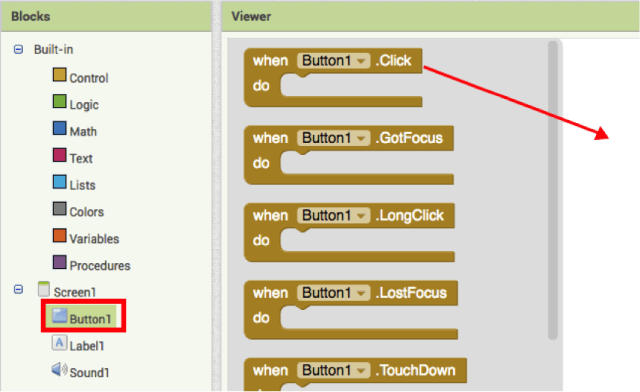
Step 1. Press button 1 on the left side of the Block Editor to open it. Slide the when Button1. Click block in the work area.
Button1

The highlighted mustard yellow blocks are known as an event handler. These blocks specify how the mobile device should respond to certain events: a button has been pressed, the phone is shaken, the user is dragging her finger over a canvas, etc.

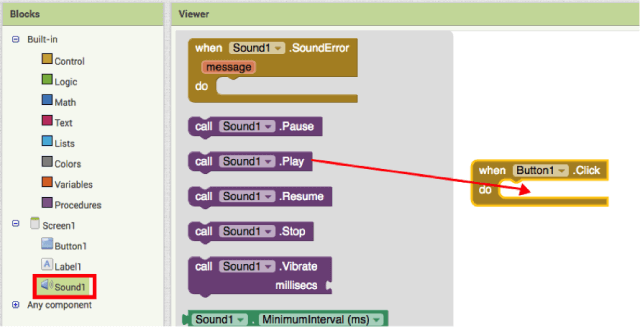
Step 2 (a). Then tap on the Sound1 option and drag Sound1 Play the block and connect it to the section of Button1.Click block. This will connect the blocks as puzzle parts, and you can hear a click sound when they connect.
tap on the Sound1

The purple blocks you see here are command blocks; they specify an action to be performed when the event is triggered. These are placed in the body of event handlers. So, when an event handler is executed, it runs the sequence of commands in its body.

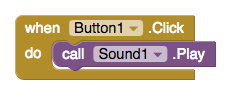
These blocks should look like the following:
blocks should look like

Now you can see that the command block is in the event handler. This set of blocks means; “when you press Button 1, Sound1 will play.”

Try this on your device or using the emulator! When you press the button, you should hear the beehive ringing.

Now you have your first application running!

Note: There may be issues with the Sound component on specific devices. If you see an “OS Error” and the sound does not play – or is significantly delayed in playing, go back into the Designer and try using a Player component (found under Media) instead of the Sound component.

Packaging your app

Now the packaging for your application.

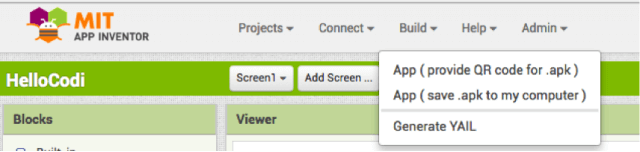
While your device/emulator is connected to App Inventor, your application works in real-time on your device. Disconnecting the block editor emulator/device will cause the application to disappear. However, you can reconnect it every time you lose the connection. To continue running your application without being connected to App Inventor, you need to “Package” the application to generate (.apk file) an application package.
Packaging your app

You can do two things:

  1. App (provide QR code):

You can use it to generate a Barcode (a QR Code); it will let you install the app on a mobile device with a camera and supports a QR/barcode scanner, for example, ZXing barcode scanner (freely available in Google Play).

Note: The bar code is only in operation for two hours. To share the app with others via QR/ barcode over a long period, you will have to download the .apk file to your PC and use third-party software to convert the file into a barcode.

  1. App (save to my computer):

You may download the application on your computer as a . apk, which you can distribute and share in any way you want by manually installing it on other devices. (it is also known as “side loading“).

Now scan the sample application on your phone.

Scan the following barcode on your phone to set up and run the sample application.

scan barcode

Or download the apk. You have a ready-to-use application.

Second way

Here is a quick video tutorial to help you set up a talking app. The tutorial consists of two parts:


TalkToMe: A beginner App Inventor app (PART 1)

TalkToMe: A beginner App Inventor app (PART 2)

For a detailed explanation, click here.

Previous Page123Next Page
TAGGED: Android/iOS Apps, App Development, Computer Programming/Coding, Free Apps and Tools, Students, Teachers/Educators, Tips for Teachers/Educators, Tools for Students, Tools for Teachers/Educators
Share This Article
Facebook Twitter Whatsapp Whatsapp LinkedIn Reddit Telegram Email Copy Link
By Saniya Khan
I am Saniya Khan, Copy-Editor at EdTechReview - India’s leading edtech media. As a part of the group, my aim is to spread awareness on the growing edtech market by guiding all educational stakeholders on latest and quality news, information and resources. A voraciously curious writer with a dedication to excellence creates interesting yet informational pieces, playing with words since 2016.
Previous Article The Best Street Style From Paris Fashion Week Spring
Next Article Indian EdTech's Global Success - Key Learnings, New Opportunities & more Indian EdTech’s Global Success – Key Learnings, New Opportunities & more
AdvertisementWhy this Ad?

Latest EdTech News To Your Inbox

Stay Connected

Facebook Twitter Youtube Instagram Linkedin


AdvertisementWhy this Ad?

Latest EdTech News To Your Inbox

Stay Connected

Facebook Twitter Youtube Instagram Linkedin
AdvertisementWhy this Ad?

You Might Also Like

The Future of Higher Education: Navigating the Path Ahead
Insight

The Future of Higher Education: Navigating the Path Ahead

July 18, 2023
Self-Directed Learning: Unleashing the Potential of Today's Students
Insight

Self-Directed Learning: Unleashing the Potential of Today’s Students

July 7, 2023
Storytelling in Nursery Schools: Igniting a Love for Books and Language
Insight

Storytelling in Nursery Schools: Igniting a Love for Books and Language

July 3, 2023
The Latest Trends and Their Impact on Medical Education
Insight

The Latest Trends and Their Impact on Medical Education

June 20, 2023
The Post-Pandemic and the New Techniques to Train Teachers for Continued Education
Insight

The Post-Pandemic and the New Techniques to Train Teachers for Continued Education

June 19, 2023
The Power of Corporate Learning
Insight

[Infographic]The Power of Corporate Learning

June 15, 2023
EdTech Investors Have Responsibility for Children’s Education
Insight

EdTech Investors Have Responsibility for Children’s Education

June 12, 2023
What is Digital Literacy Its Importance and Challenges
Insight

What is Digital Literacy, Its Importance, and Challenges?

June 6, 2023
Show More
EdTechReviewEdTechReview

H433, 2nd Floor, Vikaspuri, New Delhi, India, 110018
Phone: 011 41321030

Follow US

Copyright © EdTechReview. All Rights Reserved.

  • Home
  • Advertise
  • Event Associations
  • Press Release
  • About
  • Services
  • Contribute
  • News
  • Trend & Insight
  • Data & Statistics
  • eLearning
  • Reviews
  • Research
  • Voices
  • Dictionary
  • Tags
  • Resources
  • Events
  • Courses
  • EdTech Product for Review
  • Our Clients
  • FAQ’S
  • Contact Us
  • Important Links
  • Sitemap
  • Terms of Use
  • Privacy Policy
newsletter
Join 100K+ subscribers!

Subscribe to our weekly newsletter that brings the latest EdTech news, trends, insights, reports, interviews, etc. for educators, school leaders, entrepreneurs, investors, & others.

Zero spam, Unsubscribe at any time.
Welcome Back!

Sign in to your account

Lost your password?